
OTOBO - Communication with SMS Templates
Customer Communication with SMS Templates
Section titled “Customer Communication with SMS Templates”In today’s fast-paced world, fast and effective communication is essential, especially for companies that want to provide excellent customer service. OTOBO, the leading open-source ticket system, recognizes this need and therefore offers an innovative solution: the use of SMS templates to optimize communication.
Why SMS communication is important for your company
Section titled “Why SMS communication is important for your company”An extraordinary incident, such as an email server outage, requires alternative communication channels. This is where SMS messages come into play. They guarantee reliable notification of your on-call service and ensure that customers without internet access can be reached. With OTOBO’s cloud-based SMS service, you can master such challenges effortlessly.
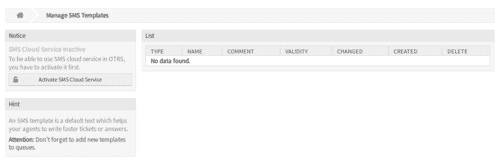
SMS Templates
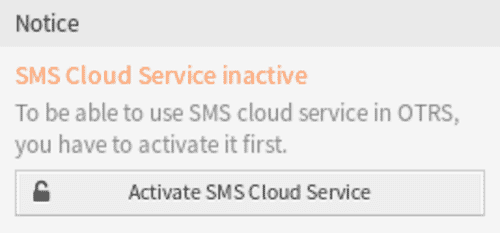
Section titled “SMS Templates”Before you can use the SMS service, activation is required. This is done in the ../otobo-services/cloud-services module.
Creating an SMS Template
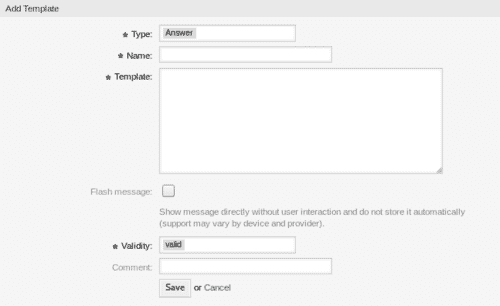
Section titled “Creating an SMS Template”- Navigate to Add SMS template and fill in the necessary details.
- Save your template by clicking on Save.
Editing and Deleting SMS Templates
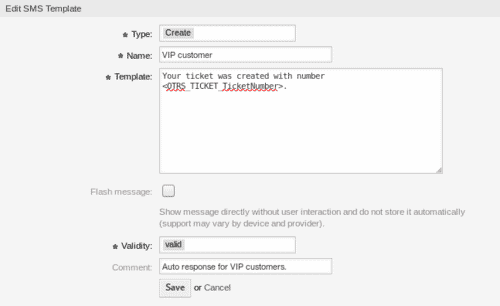
Section titled “Editing and Deleting SMS Templates”Edit existing templates by selecting and adjusting the content. Confirm your changes with Save or Save and finish. To delete a template, select the trash icon and confirm the action.
Important Settings for SMS Templates
Section titled “Important Settings for SMS Templates”When adding or editing an SMS template, important settings are available to you. These include:
- Type (e.g., Answer, Create, SMSOutbound), which defines the intended use.
- Name, which is displayed in the overview table.
- Template, the content of the message that is sent to the users.
By implementing SMS templates in OTOBO, you not only improve efficiency in ticket management but also ensure that you can reach your customers and employees anytime and anywhere. Use this powerful feature to take your customer service to a new level.
SMS Communication via Queues
Section titled “SMS Communication via Queues”OTOBO stands out due to the innovative implementation of SMS communication in your ticket management system. Through special editing options and variable settings that can be integrated into SMS messages, OTOBO increases the efficiency and personalization of communication.
Flash Messages and Message Validity
Section titled “Flash Messages and Message Validity”Flash messages offer a special way to achieve immediate attention by being displayed directly without requiring any action from the user. At the same time, setting the validity of a message allows you to precisely control its availability in the system and, if necessary, temporarily deactivate certain SMS templates.
Commenting and Personalization
Section titled “Commenting and Personalization”Each SMS template can be provided with a comment, which facilitates handling and selection for the team. This is extended by the possibility to use SMS template variables. These OTOBO-specific tags make it possible to automatically personalize messages with individual information, such as ticket numbers or queue names, thereby increasing the relevance and clarity of communication with the customer or team members.
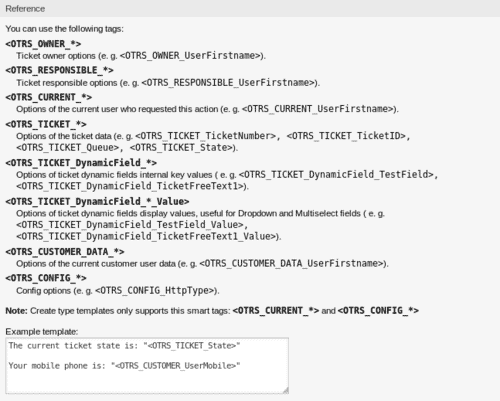
Special Function: SMS Templates ↔ Queues
Section titled “Special Function: SMS Templates ↔ Queues”An outstanding feature in OTOBO is the ability to link SMS templates directly to specific queues. This significantly simplifies the management of communication strategies and their implementation. Teams can react quickly to changes and ensure that relevant information always reaches the right people.
Simple Assignment of SMS Templates and Queues
Section titled “Simple Assignment of SMS Templates and Queues”OTOBO enables an intuitive assignment of SMS templates to different queues with just a few clicks. By visualizing these assignments in the administration area, you get a clear overview of all active communication channels.
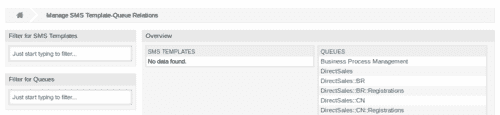
Easy-to-Understand Assignment Procedure
Section titled “Easy-to-Understand Assignment Procedure”The application of the assignment procedure is very simple: Select a template or queue, assign the desired elements to it, and confirm your selection. This allows effective and customized communication mechanisms to be established in the system.
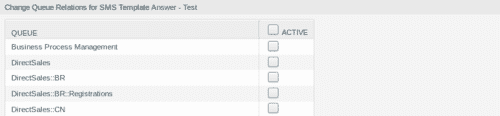
Precise Communication Channels through Filterable Overviews
Section titled “Precise Communication Channels through Filterable Overviews”For quick access to specific SMS templates or queues, OTOBO offers effective filter options. Users can immediately find and manage the desired elements by simply entering the name, which saves time and significantly increases work efficiency.
Conclusion
Section titled “Conclusion”With OTOBO’s advanced implementation of SMS templates and their assignment to queues, your company has a powerful tool at its disposal to improve customer communication, optimize processes, and increase the satisfaction of customers and team members. Use the sophisticated features of OTOBO to increase your service quality and effectiveness in ticket management.
Assigning SMS Templates to Queues
Section titled “Assigning SMS Templates to Queues”The management of SMS templates and their meaningful assignment to queues in OTOBO was developed to improve the communication flow between your agents and customers while simultaneously minimizing administrative effort. One of the most advanced features here is the ability to assign multiple SMS templates or queues simultaneously, which significantly increases flexibility and efficiency in handling these resources.
Simultaneous Assignments for Increased Effectiveness
Section titled “Simultaneous Assignments for Increased Effectiveness”This functionality allows multiple SMS templates to be added seamlessly to a multitude of relevant queues – or vice versa. Imagine your team needs to share urgent messages across multiple departments. Instead of having to make each assignment individually, OTOBO enables grouped selection and assignment, which saves time and improves the consistency of communication.
Direct Editing Options for Agile Management
Section titled “Direct Editing Options for Agile Management”Another feature of the assignment function is the direct editing option: By clicking on a specific SMS template or queue, you are taken seamlessly to the corresponding edit view. This simplifies the quick adjustment of SMS templates or queue parameters, enabling an agile reaction to new requirements or changes.
Managing Cloud Services
Section titled “Managing Cloud Services”The integration of cloud services in OTOBO makes it possible to efficiently incorporate modern communication tools into your service management processes. The flexibility and scalability of cloud services are an important factor for companies that want to make their IT infrastructure future-proof.

Activating the SMS Cloud Service
Section titled “Activating the SMS Cloud Service”To use cloud-based SMS notifications in OTOBO, activation of the service is required first. This feature is provided to expand communication options with your customers and agents.
Activation takes place in the following steps:
- Select the Activate SMS cloud service button in the sidebar.
- Fill in the mandatory fields in the configuration menu.
- Confirm your entries by clicking on Save.
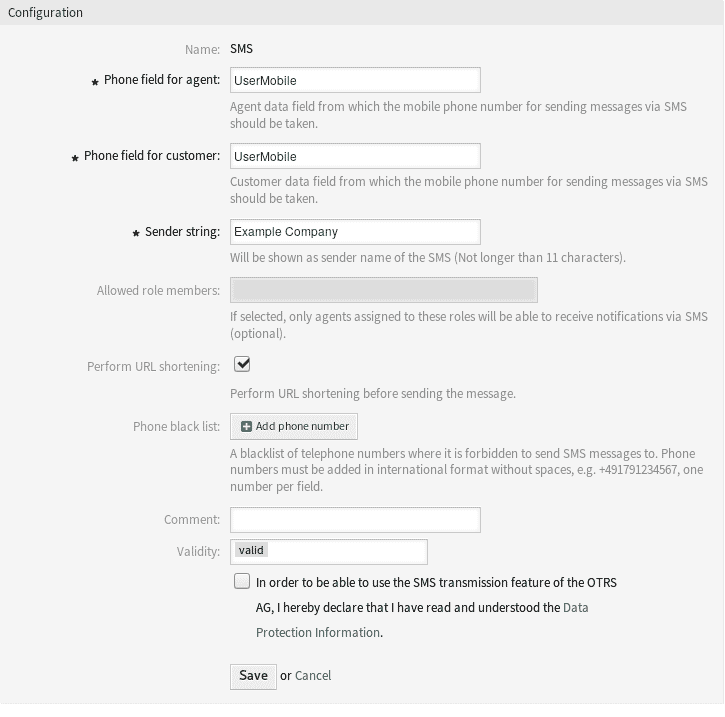
Configuration of the SMS Cloud Service
Section titled “Configuration of the SMS Cloud Service”For optimal use of the SMS service, some configurations are required. These settings include, among others:
- Phone field for agent and customer: Determines from which data field the mobile number is taken for sending messages.
- Sender ID: Defines the sender of the SMS. This should not be longer than 11 characters.
- Allowed role members: Determines which agents can receive SMS notifications.
- URL shortening: Decides whether URLs in messages should be shortened automatically.
- Phone blacklist: A list of numbers to which no SMS may be sent.
The integration of cloud services such as the SMS cloud service in OTOBO represents a valuable extension of your ticket system and enables improved and more efficient communication with customers and employees. By configuring these services according to your individual requirements, you can further maximize the benefit of your OTOBO system.
Conclusion
Section titled “Conclusion”The ability to assign and edit multiple SMS templates and queues simultaneously in OTOBO represents a significant optimization of the ticket management system. It not only improves the efficiency of administrators by reducing the need for repetitive tasks but also ensures a consistent and dynamic flow of information. While the direct link back to the relationship screen is missing, the advantages of this feature clearly outweigh it. Users are encouraged to familiarize themselves with the navigation flow to get the maximum benefit from this powerful feature.
Frequently asked questions
What are SMS templates used for in OTOBO?
SMS templates provide reusable texts for notifying customers or on-call staff when email is not available or too slow.
From which OTOBO version are SMS templates available?
SMS templates and the related cloud SMS service are planned for OTOBO version 11. Before you can use the SMS service, activation is required. This is done in the `../otobo-services/cloud-services` module. !Activating the SMS cloud service in OTOBO :::caution This functionality will only be available…
Where do I activate the SMS cloud service?
Activate it in the otobo-services / cloud-services module before creating and using SMS templates. Before you can use the SMS service, activation is required. This is done in the `../otobo-services/cloud-services` module. !Activating the SMS cloud service in OTOBO :::caution This functionality will only be available…
What should I know about Why SMS communication is important for your company?
An extraordinary incident, such as an email server outage, requires alternative communication channels. This is where SMS messages come into play. They guarantee reliable notification of your on-call service and ensure that customers without internet access can be reached. With OTOBO's cloud-based…
What should I know about Commenting and Personalization?
Each SMS template can be provided with a comment, which facilitates handling and selection for the team. This is extended by the possibility to use SMS template variables. These OTOBO-specific tags make it possible to automatically personalize messages with individual information, such as ticket…