
OTOBO ACLs
Access Control Lists (ACLs) in OTOBO are the foundation of robust permission management. In this subtopic, you will learn:
- Concepts and Business Value: Why ACLs are indispensable.
- Architecture Overview: How the ACL subsystem is structured internally.
- Match vs. Action: Basic structure of an ACL.
- System Configurations: Important SysConfig settings related to ACLs.
1. Concepts & Business Value
Section titled “1. Concepts & Business Value”ACLs define which actions agents and customers are allowed to perform in the ticket system – automated and context-sensitive.
- Security: Protect sensitive functions (e.g., closing tickets) from unauthorized use.
- Usability: Dynamically hide irrelevant buttons or menus to avoid overwhelming the user.
- Automation: Control ticket flows (prioritization, escalation, assignment) directly via ACL rules, without additional code.
- Maintainability: Export, import, and version ACLs centrally – ideal for multi-instance environments.
1.1 Role- and Criteria-based ACLs
Section titled “1.1 Role- and Criteria-based ACLs”- Role-based: Assignment based on agent roles or groups (e.g., Admin vs. Support Agent).
- Criteria-based: Control via ticket attributes (Queue, Status, Priority, DynamicFields, CustomerID).
Combining both approaches enables precise rules, e.g.: “Only senior agents can move tickets with priority > 3 to the development queue.”
2. Architecture Overview
Section titled “2. Architecture Overview”The OTOBO ACL subsystem is distributed across several core components:
| Component | Task |
|---|---|
| Kernel::System::ACL::DB::ACL | Perl backend: Persists and loads ACLs from the database |
| Kernel::System::YAML | Serializes config_match & config_change as YAML text |
| Kernel::System::Cache | Caches ACL queries with TTL (SysConfig: ACL::CacheTTL) |
| acl_sync table | Logs which ACLs are new or have been changed (sync_state) to trigger deployments |
| ZZZACL.pm | Generated Perl file that provides all validated ACLs to the ticket modules during deployment |
# Example: YAML serialization before DB insertmy $YAML = $Kernel::OM->Get('Kernel::System::YAML');my $ConfigMatchYAML = $YAML->Dump(Data => $Param{ConfigMatch});my $ConfigChangeYAML = $YAML->Dump(Data => $Param{ConfigChange});$DBObject->Do( SQL => 'INSERT INTO acl (..., config_match, config_change, ...) VALUES (?, ?, ?, ...)', Bind => [\$ConfigMatchYAML, \$ConfigChangeYAML, ...],);Note: Superusers (UserID 1) automatically ignore all ACLs – to prevent being locked out.
3. Basic Structure of an ACL: Match vs. Action
Section titled “3. Basic Structure of an ACL: Match vs. Action”| Section | Task |
|---|---|
| Match | Defines conditions: Checks ticket attributes (Properties) or DB values (PropertiesDatabase). |
| Action | Determines which UI elements (buttons, fields) are shown/hidden (Possible, PossibleAdd, PossibleNot) or which actions are executed (status/queue change). |
Example Match options:
Queue,Status,PriorityDynamicField_<Name>,CustomerUser,OwnerFrontend::Module(AgentTicketZoom, CustomerTicketCreate)
Example Action options:
Possible: Whitelist, e.g., allow only certain queues or statusesPossibleAdd: Add additional values to a limited selectionPossibleNot: Remove certain buttons (e.g., AgentTicketClose) from the UI
4. Important SysConfig Settings
Section titled “4. Important SysConfig Settings”The core elements mentioned above are configured via SysConfig:
| Key | Description | Example Value |
|---|---|---|
ACL::CacheTTL | Cache lifetime in seconds (backend) | 3600 |
ACLKeysLevel1MatchTicket | Allowed first level for Match (Properties, PropertiesDatabase) | Properties, PropertiesDatabase |
ACLKeysLevel1ChangeTicket | Allowed first level for Change (Possible, PossibleAdd, PossibleNot) | Possible, PossibleAdd, PossibleNot |
ACLKeysLevel2::PropertiesTicket | Allowed Match keys (Queue, State, DynamicField, etc.) | Queue, State, CustomerUser, ... |
ACLKeysLevel2::PossibleTicket | Allowed Change keys (Form, FormStd, Action, Process, Ticket) | Form, FormStd, Action, ... |
ACLKeysLevel3::Actions###DefaultTicket | List of all possible actions in the UI (AgentTicketClose, AgentTicketEmail, …) | (see list) |
Tip: Adjust
ACLKeysLevel*to populate the ACL UI only with relevant entries.
Evaluation, Stop-on-Match & Performance
Section titled “Evaluation, Stop-on-Match & Performance”The evaluation of ACLs (Access Control Lists) determines which rules are applied when a ticket is loaded or an action is performed in the ticket system. Efficient configuration of these processes and targeted performance optimizations are crucial to ensure a smooth and scalable agent interface.
Evaluation Cycle
Section titled “Evaluation Cycle”Every time an agent opens a ticket or performs an action (e.g., button click), OTOBO runs through the list of all active ACLs ordered by their sort key (name or ID). The following sequence shows the check and execution process:
flowchart TB
    A[Ticket Load / User Action] --> B{List of active ACLs}
    B --> C[Check ACL1: Match?]
    C -->|yes| D[Execute ConfigChange 1]
    C -->|no| E[Check ACL2]
    D --> F{StopAfterMatch=1?}
    F -->|yes| G[Stop: no further ACLs]
    F -->|no| E
    E -->|…| H[Check ACLN]
    H -->|yes| I[Execute ConfigChange N]
    H -->|no| J[Default behavior]
- Match (ConfigMatch): Criteria such as Queue, Status, Priority, or DynamicFields are checked here.
- Change (ConfigChange): Defines which UI elements are removed or added (Possible, PossibleAdd, PossibleNot) or which automatic actions occur (queue/status change).
- StopAfterMatch: If set to 1, processing stops after the first matching ACL.
Remember: A correctly set
StopAfterMatchprevents subsequent ACLs from triggering unintended changes.
Stop-on-Match Strategies
Section titled “Stop-on-Match Strategies”| Option | Effect |
|---|---|
| StopAfterMatch=1 | As soon as an ACL matches, no further ones are checked – ideal for exclusive rules. |
| StopAfterMatch=0 | All ACLs are checked – necessary if multiple ACLs should intervene independently. |
Tip: Numeric prefixes (e.g., 100-, 200-) in the ACL name control the natural sorting and thus the priority of critically important rules.
Performance Optimization
Section titled “Performance Optimization”A large set of ACLs can increase ticket form loading times. These measures help to increase performance:
- Adjust CacheTTL: In SysConfig under
ACL::CacheTTL(e.g., 3600 s), you define how long loaded ACL definitions remain in the cache. - Activate Preselection-Cache: The module
TicketACL::ACLPreselectionpre-fills selected options and saves repeated checks. - Rule Reduction: Remove outdated or duplicate ACLs and bundle similar rules.
- Optimize Sequence: Place frequently matching ACLs at the beginning of the list.
- Indexed Fields: Use DB indexes for DynamicFields and other frequently queried properties.
<Setting ID="ACL::CacheTTL"> <Group>Core::Ticket::ACL</Group> <Value>3600</Value> <Description>Cache lifetime for DB ACL backends in seconds.</Description></Setting>Maintenance & Best Practices
Section titled “Maintenance & Best Practices”| Practice | Benefit |
|---|---|
| YAML Export | Version ACLs in Git to track changes. |
| Documentation | Create a change log with timestamps, author, and purpose of the ACL. |
| Rule Review | Regular team reviews prevent overlaps. |
| Test Environment | Validate new ACLs with controlled test tickets. |
| Log Debugging | Enable debug logs (TicketACL::Debug::Enabled) for detailed insights. |
Configuring Debugging
Section titled “Configuring Debugging”<Setting ID="TicketACL::Debug::Enabled"> <Group>Core::Ticket::ACL</Group> <Value>1</Value> <Description>Enable ACL debugging</Description></Setting><Setting ID="TicketACL::Debug::Filter###00-DefaultTicket.xml"><Group>Core::Ticket::ACL</Group><Value><OTOBO_TICKET_TicketID></Value><Description>Filter for debug output by Ticket ID.</Description></Setting>Through these targeted strategies, you ensure that your ACL infrastructure in OTOBO remains both powerful and maintainable – even in large, distributed environments.
Practical Examples, Governance & Reference
Section titled “Practical Examples, Governance & Reference”In this final part of the article, we show how ACLs are used in OTOBO using concrete scenarios. We then cover proven governance methods and point to further references.
Practical Examples
Section titled “Practical Examples”1. Automatic Prioritization into the “Alarm” Queue
Section titled “1. Automatic Prioritization into the “Alarm” Queue”Goal: Move tickets with priority 5 (very high) immediately to the Alarm queue and notify the owner.
- Name: "100-Auto-Alarm" StopAfterMatch: 1 ValidID: 1 ConfigMatch: Properties: Priority: ID: [ 5 ] ConfigChange: PossibleNot: Form: - ticketCreateQuickClose PossibleAdd: Form: - ticketCreateNotifyOwner Action: Queue: "Alarm"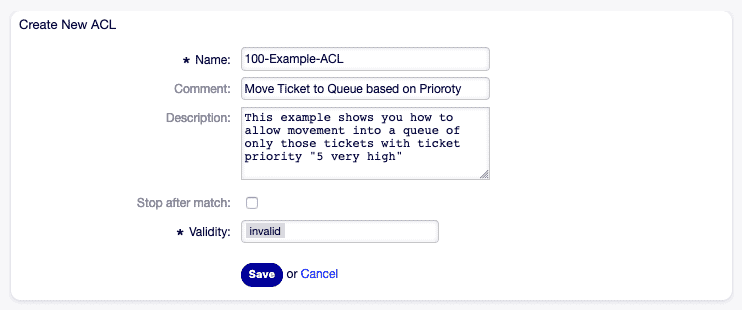
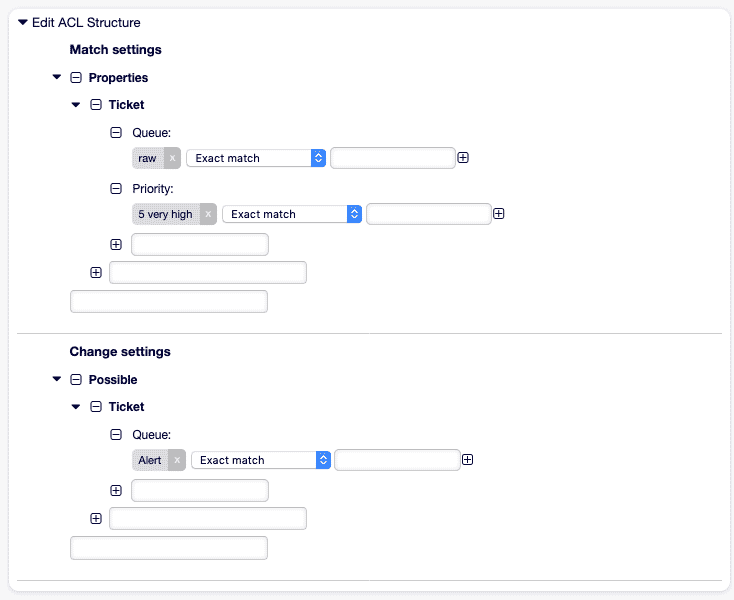
2. Escalation Protection for “Very High” Priority Tickets
Section titled “2. Escalation Protection for “Very High” Priority Tickets”Goal: Prevent tickets with database priority 5 from being closed.
- Name: "101-No-Close-High" StopAfterMatch: 1 ValidID: 1 ConfigMatch: PropertiesDatabase: Priority: Name: [ "5" ] ConfigChange: PossibleNot: Action: - AgentTicketClose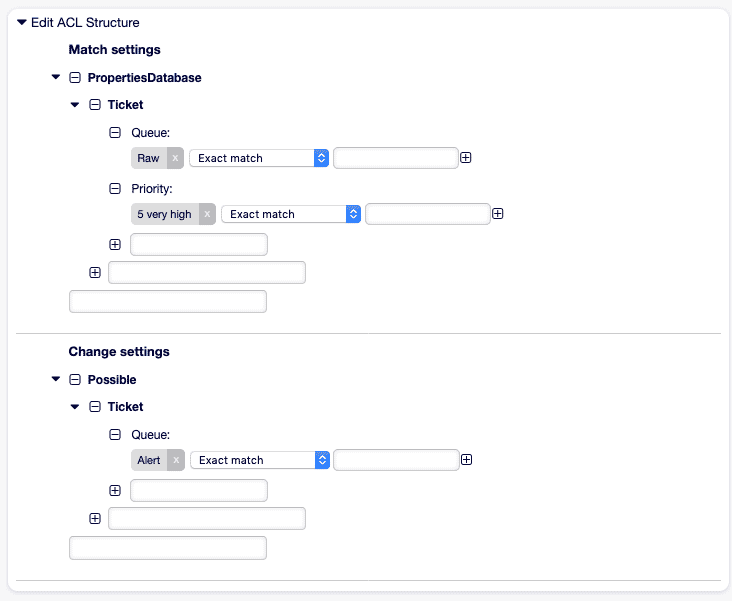
3. UI Restriction per Queue
Section titled “3. UI Restriction per Queue”Goal: In the Support queue, the status option resolved should not be available.
- Name: "102-Hide-Resolved-Support" ValidID: 1 ConfigMatch: Properties: Queue: Name: [ "Support" ] ConfigChange: PossibleNot: FormStd: - State::resolved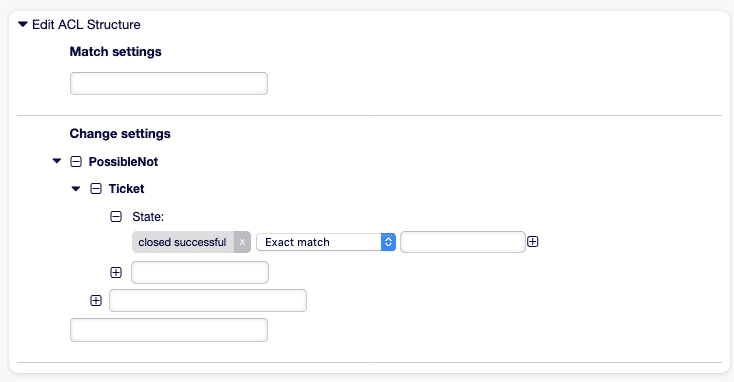
4. Customer Process Restriction
Section titled “4. Customer Process Restriction”Goal: Customers are not allowed to move their own tickets to other queues.
- Name: "103-Cust-No-Reassign" ValidID: 1 ConfigMatch: Properties: Frontend: Action: - CustomerTicketZoomReply ConfigChange: PossibleNot: Action: - AgentTicketMove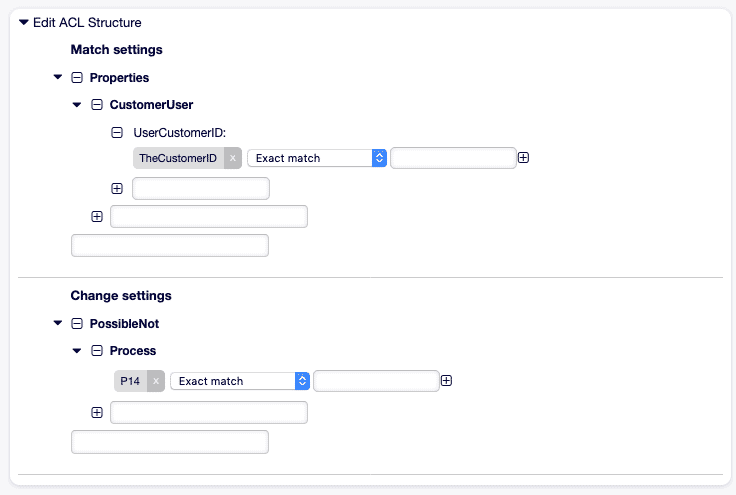
5. Time-based Escalation after 48 Hours
Section titled “5. Time-based Escalation after 48 Hours”Goal: Tickets that have been open for more than 48 hours are automatically assigned to Senior Agents.
- Name: "104-Escalate-48h" ValidID: 1 ConfigMatch: Properties: Ticket: CreateTimeOlderThan: 48h ConfigChange: Action: Owner: "Senior-Agenten"Note: This scenario may require an extension for time-based match criteria.
Governance & Documentation
Section titled “Governance & Documentation”| Measure | Description |
|---|---|
| Naming Convention | Numeric prefixes (e.g., 100-, 200-) for sorting and clarity. |
| Changelog | Log Name, Comment, ChangeTime, and ChangeBy for every ACL change. |
| Review Process | Conduct regular reviews to avoid overlaps and conflicts. |
| Versioning | Export ACLs as YAML and version them in Git or a documentation tool. |
| Testing | Validate ACLs in a test environment with specific test tickets. |
Further References
Section titled “Further References”- ACL Reference (YAML):
Kernel/Config/Files/ZZZACL.pm(generated) - SysConfig ACL Keys: Level 1–3 terms for fine-tuning (
Core::Ticket::ACL) - DynamicField Documentation: Integration of dynamic fields in ACLs
With these practical examples and governance recommendations, you now have the tools to operate ACLs in OTOBO securely, efficiently, and transparently.
Frequently asked questions
What do Access Control Lists control in OTOBO?
ACLs define which actions agents and customers may perform, and which UI elements are shown or hidden based on ticket context.
Do ACLs apply to the superuser account?
No. Superusers (UserID 1) automatically ignore all ACLs so they cannot lock themselves out of the system.
What is the difference between Match and Action in an ACL?
Match defines the conditions (ticket attributes or DB values). Action determines which UI elements or ticket values are allowed, added, or blocked.
What should I know about 2. Architecture Overview?
The OTOBO ACL subsystem is distributed across several core components: Note: Superusers (UserID 1) automatically ignore all ACLs – to prevent being locked out. ---
What should I know about 4. Important SysConfig Settings?
The core elements mentioned above are configured via SysConfig: Tip: Adjust `ACLKeysLevel*` to populate the ACL UI only with relevant entries.