
Optimizing the Use of OTOBO Session Management and SQL Box
Session Management in OTOBO
Section titled “Session Management in OTOBO”Session management is a critical aspect in the administration of web-based applications like the OTOBO Helpdesk. It allows administrators to efficiently oversee who is active in the system and, if necessary, terminate unwanted sessions immediately. For optimal management of agent and customer sessions, OTOBO offers advanced features that make it easy to manage logged-in users and terminate their sessions when needed.
Accessing Session Management in OTOBO
Section titled “Accessing Session Management in OTOBO”To access session management in OTOBO, navigate to the Session Management module under the Administration group. This provides you with quick access to all essential functions for monitoring and managing user sessions.
Session management screen in OTOBO
Detailed Overview and Management of Individual Sessions
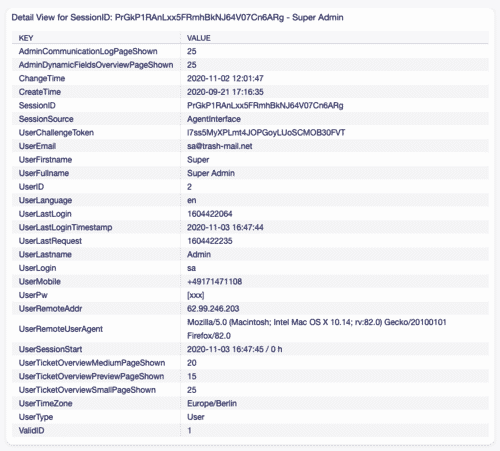
Section titled “Detailed Overview and Management of Individual Sessions”To obtain details about a specific user session:
- Select the desired user from the list of active sessions.
- Click on the respective token to view session details.
Terminating Unwanted or Inactive Sessions
Section titled “Terminating Unwanted or Inactive Sessions”Terminating an individual session is quick and easy:
- Select the corresponding session.
- Click on Kill this session in the Kill column to terminate the session immediately.
![Terminating a session in OTOBO [1]](https://softoft.sirv.com/Images/otobo/docs/session-management-kill)
Warning
Section titled “Warning”Terminating sessions occurs without confirmation, which may result in the loss of unsaved work. Please exercise caution when using this feature.
Managing All Sessions Simultaneously
Section titled “Managing All Sessions Simultaneously”For situational requirements where all sessions need to be terminated:
- Click on Delete all sessions to terminate all active sessions system-wide.
This process should be performed with care, as it will result in the loss of any active work by users.
Filter Function for Efficient Session Management
Section titled “Filter Function for Efficient Session Management”When there is a high number of logged-in users, the filter field can be used to search for specific sessions. Simply enter the user’s name or other relevant information into the filter field to refine your search.
By optimally using OTOBO session management, administrators can significantly increase the security and efficiency of the helpdesk. Targeted control of user sessions allows for proactive responses to security and performance management requirements.
OTOBO SQL Box - Database Access
Section titled “OTOBO SQL Box - Database Access”In the digital age, data is the key to success. For operators of ticket systems like OTOBO, it is essential to gain deep insights into their data. Whether for creating customized reports, using external analysis tools, or simply conducting a thorough investigation of ticket behavior, direct access to the database becomes indispensable. OTOBO understands this necessity and therefore offers its powerful feature called the SQL Box. This tool is a true game-changer for administrators, as it allows them to perform database queries directly without command-line access and to conveniently visualize the results in the graphical user interface (GUI) or export them in common formats like CSV or Excel for further analysis.
Direct Database Queries with the SQL Box
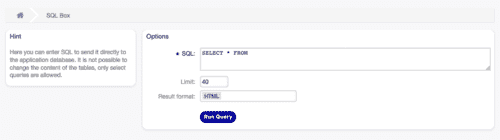
Section titled “Direct Database Queries with the SQL Box”The SQL Box is easily accessible in the Administration group of the OTOBO system under the SQL Box module. This powerful tool was specifically developed to enable administrators to perform SQL queries directly in the GUI. An absolute added value that not only saves administrators time but also simplifies and improves the overall experience with the OTOBO system.
How to Query SQL Statements in OTOBO
Section titled “How to Query SQL Statements in OTOBO”Operating the SQL Box is very simple and intuitive:
- Type your SQL statement into the designated field.
- Select the desired output format (HTML, CSV, Excel).
- Click the Run query button to start the query.
It is important to note that by default, only SELECT queries are allowed to maintain the integrity of your data.
However, should there be a need to make changes to the database directly via the SQL Box, the
system configuration setting AdminSelectBox::AllowDatabaseModification allows for such flexibility – although this
should be done with caution and after weighing all risks.
![SQL Box settings in OTOBO [1]](https://softoft.sirv.com/Images/otobo/docs/sql-box-settings)
Customizing Your Data Queries
Section titled “Customizing Your Data Queries”The SQL Box offers the ability to limit the result of your queries and define the format of the output, thus allowing you to optimally adapt your queries to your individual requirements. Whether you need a quick overview in the form of an HTML table or wish to conduct detailed data analysis, the export options in CSV or Excel make it possible.
Inspiring Examples for SQL Queries in OTOBO
Section titled “Inspiring Examples for SQL Queries in OTOBO”To fully exploit the potential of the SQL Box, here are some examples of how you can make useful information visible using simple SQL commands:
Listing Agent Information
Section titled “Listing Agent Information”SELECT id, login, first_name, last_name, valid_idFROM users![Result of an SQL query in OTOBO [1]](https://softoft.sirv.com/Images/otobo/docs/sql-box-result)
List of All Tables
Section titled “List of All Tables”To display all tables in your database, simply execute the query SHOW TABLES without a limit.
Structure of the users Table
Section titled “Structure of the users Table”To explore the structure of a specific table like users, limit the results and execute a query such as
SELECT * FROM users.
Conclusion
Section titled “Conclusion”By effectively using the SQL Box in OTOBO, administrators can achieve a new level of control and insight into their data. This flexibility and power to access valuable information directly represents an invaluable advantage when working with ticket systems.::: details Do you have questions about this article on the OTOBO SQL Box?
Frequently asked questions
What is session management in OTOBO?
It lets administrators view and manage active user sessions to improve efficiency and security of the helpdesk.
What is the SQL Box used for?
The SQL Box is an admin tool for running carefully controlled database queries during troubleshooting and maintenance.
Can you end user sessions from the Admin area?
Yes. Session management typically allows administrators to inspect and terminate active sessions when needed.
What should I know about Terminating Unwanted or Inactive Sessions?
Terminating an individual session is quick and easy: 1. Select the corresponding session. 2. Click on _Kill this session_ in the _Kill_ column to terminate the session immediately. ![Terminating a session in OTOBO [1]](https://softoft.sirv.com/Images/otobo/docs/session-management-kill)
What should I know about Warning?
Terminating sessions occurs without confirmation, which may result in the loss of unsaved work. Please exercise caution when using this feature.