
OTOBO – Planning and managing system maintenance
System maintenance is a central component of any IT administration. Some maintenance tasks require a temporary suspension of live operations. In these cases, it is particularly important to inform users in good time and to keep the system accessible only to administrators.
With the System maintenance module in the Admin interface, OTOBO provides a clear interface for creating and adjusting maintenance windows and warning users via login messages or in-app notifications.
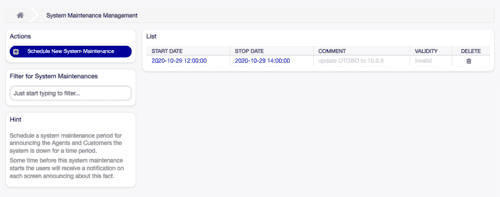
Adding new system maintenance
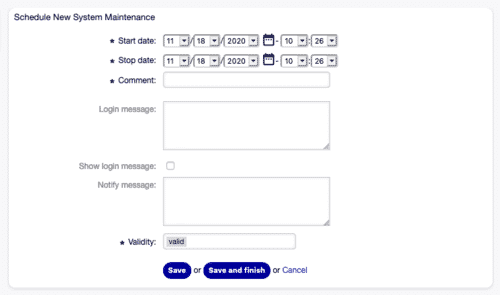
Section titled “Adding new system maintenance”- Click on Add new system maintenance.
- Fill in the Start date, End date, and Comment (description).
- Optionally activate the Login message and/or Notification message.
- Save with Save.
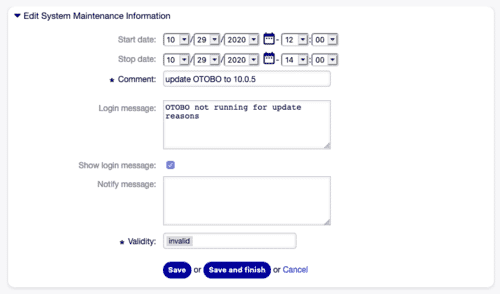
Editing existing system maintenance
Section titled “Editing existing system maintenance”- Select the entry in the maintenance overview.
- Adjust the start/end date, message, or validity status.
- Click on Save.
Deleting system maintenance
Section titled “Deleting system maintenance”- Click on the trash icon next to the desired entry.
- Confirm with Confirm.

Note: Use the filter field to quickly find maintenance tasks by name.
Important settings
Section titled “Important settings”- Start date / End date
- Comment * (displayed in the list)
- Show login message (login screen)
- Notification message (in-app notice before maintenance)
- Validity * (active / inactive)
Session management
Section titled “Session management”In addition to scheduled maintenance, it is often necessary to monitor active user sessions and terminate them if required.
In the Session management module, you can see all currently logged-in users:
- Terminate individual sessions: Click on Terminate this session
- Terminate all except your own session: Click on Terminate all sessions except your own
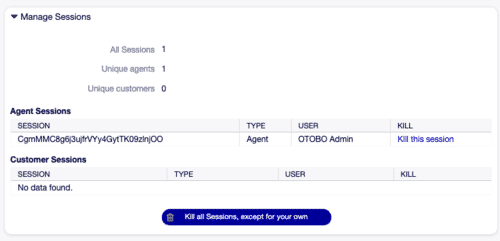
These functions help to quickly clean up the system after maintenance or in the event of security incidents.
Conclusion
Section titled “Conclusion”With the System maintenance module and Session management, OTOBO / Znuny provides administration tools to:
- Announce maintenance windows transparently
- Inform users proactively
- Restrict access during the maintenance window
- Securely manage active sessions at any time
This ensures smooth system maintenance while maintaining user satisfaction.
Frequently asked questions
What is the primary purpose of the OTOBO System Maintenance module?
The OTOBO System Maintenance module is a crucial tool for IT administrators to effectively plan and manage system downtime. Its main purpose is to allow administrators to schedule maintenance windows in advance, ensuring that users are well-informed about upcoming service interruptions. This is achieved through configurable login messages displayed on the login screen and in-app notifications shown to logged-in users before maintenance begins. During an active maintenance window, the module typically restricts system access, allowing only administrators to log in and perform necessary tasks, thereby ensuring operational integrity and minimizing disruption for regular users.
How do administrators create and configure a new maintenance window in OTOBO?
To create a new system maintenance window in OTOBO, administrators navigate to the Admin interface and select the System maintenance module. From there, they click on Add new system maintenance. The process involves specifying the Start date and End date for the maintenance period, along with a descriptive Comment that will be visible in the maintenance overview. Administrators can also choose to activate a Login message to inform users on the login screen and/or a Notification message for in-app alerts before the maintenance begins. Finally, the configuration is saved by clicking Save. The validity status can also be set to active or inactive.
How does OTOBO inform users about upcoming or active system maintenance?
OTOBO employs two primary methods to inform users about system maintenance: login messages and in-app notifications. When a maintenance window is configured with the Show login message option activated, users attempting to log in will see a custom message on the login screen, informing them about the scheduled downtime. Additionally, if the Notification message is enabled, logged-in users will receive an in-app notice prior to the maintenance period. The timing of this in-app warning can be controlled via the SystemMaintenance::TimeNotifyUpcomingMaintenance system configuration setting, which specifies how many minutes before the start the notification appears. During an active maintenance window, OTOBO typically restricts access, allowing only administrators to log in, ensuring that critical maintenance tasks can be performed without interference.
What is the role of Session Management in conjunction with system maintenance?
Session Management plays a crucial role alongside system maintenance by providing administrators with the ability to monitor and control active user sessions. While not directly part of scheduling maintenance, it is often necessary to manage user access before, during, or immediately after a maintenance window. In the Session management module, administrators can view all currently logged-in users. This allows for actions such as terminating individual user sessions by clicking Terminate this session, or efficiently clearing the system by choosing Terminate all sessions except your own. These functions are particularly useful for ensuring a clean system state before maintenance begins, for security reasons, or to force users off the system after a maintenance period to ensure they reload any updated configurations or code.
Can the default messages for system maintenance notifications be customized, and how?
Yes, the default messages displayed for system maintenance notifications in OTOBO can be fully customized through the system configuration settings. Administrators can define the default text for the login screen message using the SystemMaintenance::IsActiveDefaultLoginMessage setting. Similarly, the default text for the in-app notification message, which appears before maintenance, can be configured via SystemMaintenance::IsActiveDefaultNotification. Beyond the message content, the timing of the in-app warning can also be controlled. The SystemMaintenance::TimeNotifyUpcomingMaintenance setting allows administrators to specify, in minutes, how far in advance of the maintenance start time the notification should be displayed to logged-in users. This level of customization ensures that communication with users is clear, consistent, and tailored to the organization's specific needs.