
OTOBO Version 11 – New Features, CMDB & Docker (2025/2026)
In this guide: Overview of OTOBO 11 features, release status, and upgrade considerations.
Related: Installation · Docker · Znuny vs OTOBO · OTOBO AI
OTOBO Version 11 sets new standards for open-source ticket systems: In addition to a completely redesigned CMDB and extended ITSM functions, you benefit from flexible forms, a modern UI, comprehensive Docker integration, and important security and performance optimizations.
Key Features at a Glance
Section titled “Key Features at a Glance”- ITSM, CSM & ESM: Incident, Problem, and Change Management, Customer and Enterprise Service Management in one tool.
- CMDB Redesign: Tree View, formula fields, reference & lens fields, granular CI access.
- Dynamic Forms: New field types, multi-column layouts, hide/show logic, process support.
- Docker & Scaling: Recommended operation in containers for easy maintenance and high availability.
- Security & Performance: CVE fixes, optimized password hashes, fast form processing.
- Release Status 2026: Latest version 11.0.16 (April 2026), a security patch with a focus on stability and bug fixes.
Dynamic Fields & Ticket Forms
Section titled “Dynamic Fields & Ticket Forms”- New Field Types
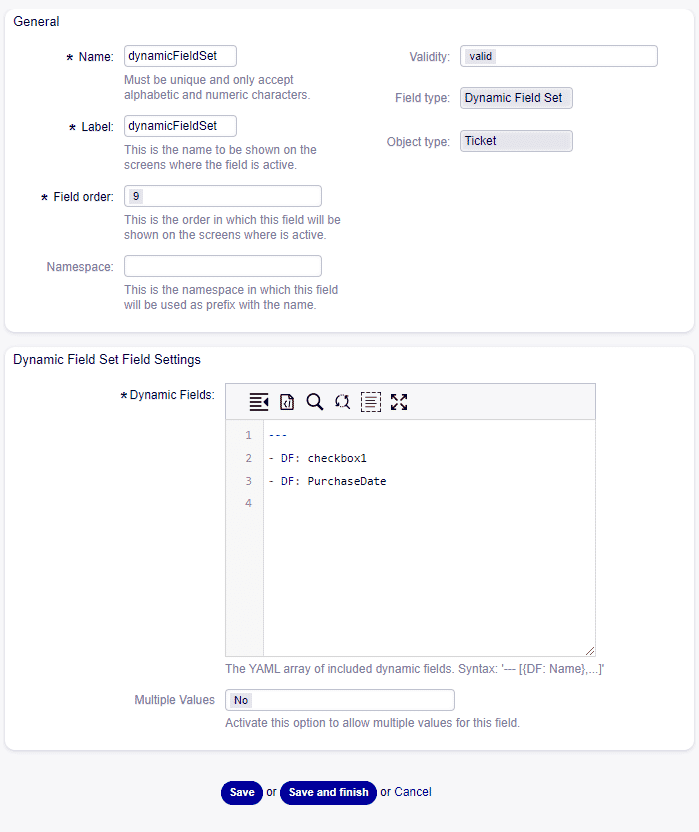
- DynamicFieldSet: Grouping of multiple fields (e.g., address)
- MultiValue: Repeatable field groups with ”⊕”/”⊖” control
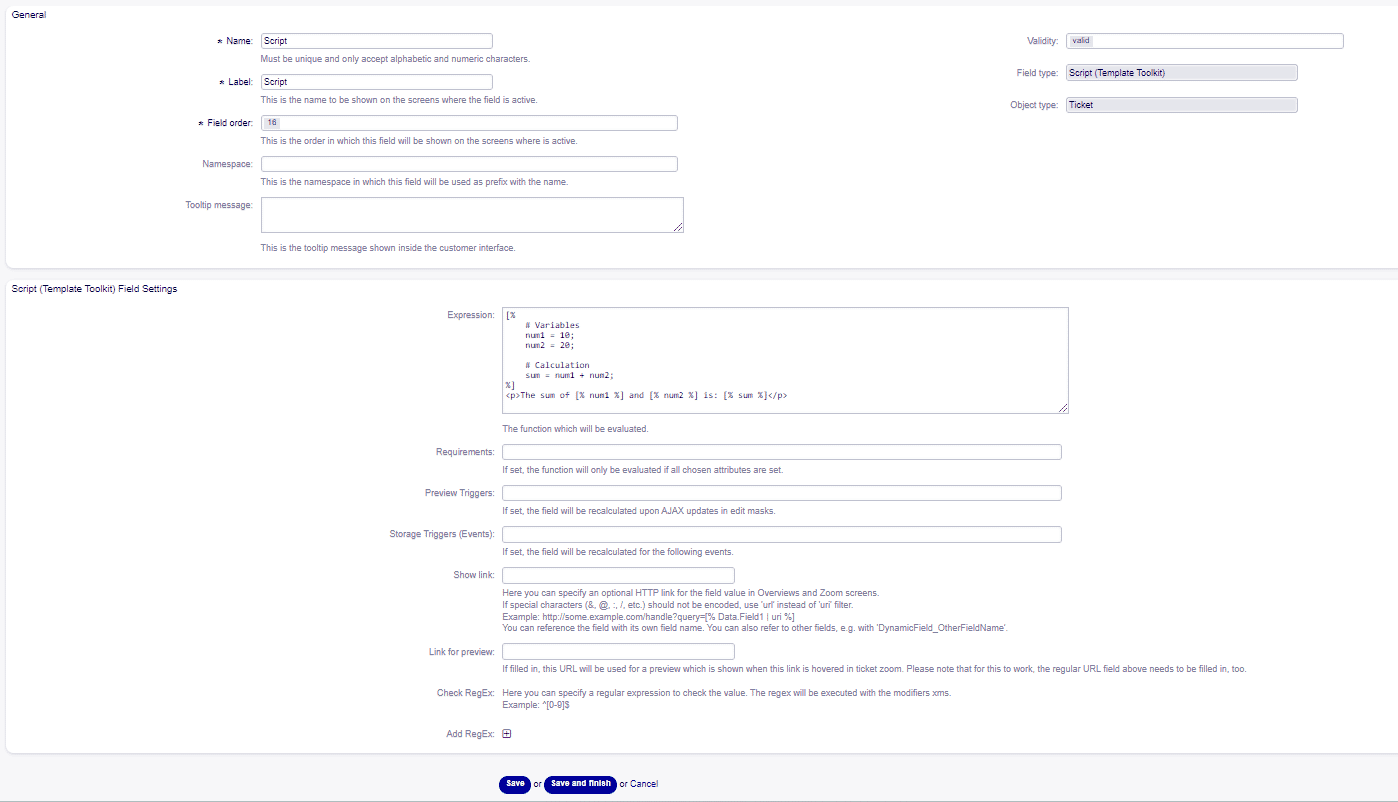
- Script: Automation via custom script
- GeneralCatalog, Richtext, Attachment
- References & Lens
- Linking to agents, customers, tickets, CIs
- Lens Fields: Direct editing of CI attributes in the ticket
- Layout & Logic
- Multi-column design for ticket masks
- Hide/show and read-only fields
- Mandatory fields with explanatory notes
- All form features available in process tickets
- Administration
- YAML-based mask editor
- Filters and namespaces for Dynamic Fields
- Import/export of catalog lists
CMDB (Configuration Management Database)
Section titled “CMDB (Configuration Management Database)”- New & Beta: Completely redesigned CMDB with a focus on IT and non-IT assets.
- Tree View: Visual representation of dependencies.
- Formula Fields: Dynamic calculations and data validation.
- Reference & Lens Fields: Edit CI attributes directly in tickets.
- Permissions: Granular access for agents and customers.
- Data Migration: Existing CI data from version 10 is migrated.
ITSM Add-Ons & Workflow Optimization
Section titled “ITSM Add-Ons & Workflow Optimization”- Extended modules for Incident, Problem, Change
- Process tickets with direct approve/reject buttons
- Automated workflows thanks to script fields and Web Services
User Interface & Usability
Section titled “User Interface & Usability”- Quick-Time Buttons: Adjust wait times with a click
- Read/Unread: Mark tickets & articles
- CKEditor 5: Modern WYSIWYG editor for article text
- Customer Info Tile: Display important notes in the customer portal
- Article Revisions: Subsequent editing with logging
Roles, Rights & LightAdmin
Section titled “Roles, Rights & LightAdmin”- LightAdmin Mode: Delegation of individual admin areas (e.g., signatures)
- Access Control: Fine-grained control for CI view and field permissions
Multilingualism & Translation Management
Section titled “Multilingualism & Translation Management”- UI-supported translations without code changes
- Excel import/export for direct editing
- Filter for missing translations
REST API & Integrations
Section titled “REST API & Integrations”- Customizable HTTP headers in Web Services
- New CLI command for manually triggering interfaces
- Migration of old OTOPar fields via console
- Optional Kerberos authentication (Beta)
Security & Performance
Section titled “Security & Performance”-
Security Fixes:
- CVE-2025-43926: Privilege escalation closed
- Secure hashing & 2FA generation improved
-
Performance:
- Optimized container images
- Faster form rendering and API responses
-
Log Rotation: Since version 11.0.11, OTOBO handles log rotation for
otobo.logdirectly, which simplifies external configurations.
Optional AI add-on (OpenTicketAI)
Section titled “Optional AI add-on (OpenTicketAI)”OTOBO 11’s REST API and flexible ticket masks allow optional third-party AI integrations. OpenTicketAI is one add-on that can classify incoming tickets and assign queue or priority automatically.
Current Release Status & Patches (2026)
Section titled “Current Release Status & Patches (2026)”The latest release is OTOBO 11.0.16 (April 23, 2026), a security patch that all users are strongly advised to install:
- Security: Fixed XSS vulnerabilities (CVE-2025-59490) and updated
Compress::Raw::Zlibto address CVE-2026-3381 in Docker environments; improved password masking in the Support Bundle generator. - Enhancements: Email X-headers can now be used as an external data source for dynamic (reference) fields; clearer output from the rel-11_0 database update script.
The prior release OTOBO 11.0.15 (February 4, 2026) brought further detailed improvements:
- Stability: Fixes for multi-value fields and their visibility with empty values.
- User Experience: Corrections in the CKEditor (formatting highlights) and cleanup of the ticket history for better clarity.
A parallel security patch OTOBO 10.1.17 was released on the same day for the still-maintained 10.1 line.
[!IMPORTANT] OTOBO 10.0 EOL: Version 10.0 reached its end-of-life on January 1, 2026. An upgrade to version 11 is strongly recommended to continue receiving security updates.
Migration to Version 11
Section titled “Migration to Version 11”- Instructions for upgrading from OTOBO 10/OTRS
- Seamless transfer of existing configurations and data
Conclusion
Section titled “Conclusion”OTOBO 11 combines modern ITSM functions with high customizability, efficient CMDB management, and robust security. This version is ideal for companies that rely on open standards, flexibility, and scalability.
Frequently asked questions
What are the main new features introduced in OTOBO Version 11?
OTOBO Version 11 brings significant advancements, setting new standards for open-source ticket systems. Key features include a completely redesigned CMDB (Configuration Management Database) with enhanced functionalities for IT and non-IT assets, and extended ITSM, CSM, and ESM capabilities covering Incident, Problem, and Change Management. The release also introduces highly flexible Dynamic Forms with new field types and layout options, comprehensive Docker integration for easier maintenance and scalability, and crucial security and performance optimizations. These updates aim to provide a more robust, customizable, and efficient service management solution.
How does OTOBO 11 enhance the CMDB (Configuration Management Database)?
OTOBO 11 features a completely redesigned CMDB, marking a significant upgrade focused on managing both IT and non-IT assets more effectively. Key enhancements include a visual Tree View for representing dependencies between Configuration Items (CIs), and the introduction of Formula Fields for dynamic calculations and data validation. Reference and Lens Fields allow agents to directly view and edit CI attributes within tickets, streamlining workflows. Furthermore, granular permissions can be set for agents and customers, controlling access to CI views and field permissions. Existing CI data from OTOBO 10 is seamlessly migrated during the upgrade process.
What improvements does OTOBO 11 offer for user interface and usability?
OTOBO 11 significantly enhances the user interface and overall usability to improve agent and customer experience. New features include Quick-Time Buttons, which allow agents to adjust wait times with a single click, and the ability to mark tickets and articles as Read/Unread for better organization. The system integrates CKEditor 5, a modern WYSIWYG editor for article text, offering a more intuitive writing experience. A Customer Info Tile is introduced to display important notes directly in the customer portal, and Article Revisions enable subsequent editing of articles with full logging, ensuring transparency and traceability of changes. These improvements aim to make daily tasks more efficient and user-friendly.
How do Dynamic Forms work in OTOBO 11, and what new field types are available?
OTOBO 11 introduces highly flexible Dynamic Forms with advanced capabilities for ticket masks and processes. New field types significantly expand customization options: DynamicFieldSet allows grouping of multiple fields (e.g., address details), MultiValue fields enable repeatable field groups with add/remove controls, and Script fields facilitate automation via custom scripts. Other new types include GeneralCatalog, Richtext, and Attachment fields. Forms also support multi-column layouts, hide/show logic, and read-only fields, along with mandatory fields that can include explanatory notes. These features are fully available in process tickets, and administration is streamlined with a YAML-based mask editor, filters, namespaces for Dynamic Fields, and import/export functionality for catalog lists.
What are the migration options and current release status for OTOBO 11?
OTOBO 11 provides clear migration paths for users upgrading from OTOBO 10 or OTRS, ensuring a seamless transfer of existing configurations and data. The latest release is OTOBO 11.0.16, issued on April 23, 2026, which is a security patch strongly advised for all users. This patch addresses XSS vulnerabilities (CVE-2025-59490), updates Compress::Raw::Zlib for CVE-2026-3381 in Docker, and improves password masking. The prior release, OTOBO 11.0.15 (February 4, 2026), focused on stability and user experience improvements. It's important to note that OTOBO 10.0 reached its End-of-Life on January 1, 2026, meaning it no longer receives security updates, making an upgrade to version 11 highly recommended.
What security and performance enhancements are included in OTOBO 11?
OTOBO 11 delivers significant improvements in both security and performance. Security fixes address critical vulnerabilities, including CVE-2025-43926 (privilege escalation) and CVE-2025-59490 (XSS vulnerabilities), alongside improvements in secure hashing and 2FA generation. For Docker environments, Compress::Raw::Zlib was updated to mitigate CVE-2026-3381. Performance enhancements include optimized container images, faster form rendering, and quicker API responses. Additionally, since version 11.0.11, OTOBO directly manages log rotation for otobo.log, simplifying external configurations. These updates ensure a more secure, stable, and efficient operating environment.