
OTOBO Customer Users - Managing Users
OTOBO allows companies to build an extensive database of customer information, including essential details such as location data for shipping and billing purposes, as well as contact information like email and phone numbers. This is particularly relevant, as the efficient management of customer user data is indispensable for customer service and contributes directly to improving customer retention.
The platform offers an intuitive interface for editing and expanding contact information within the organizations served by your company. For optimal customer relationship management, an unlimited number of customer users can be added in OTOBO.
Managing Customer Users
Section titled “Managing Customer Users”To start managing customer users, it is essential to have access to the Customer User management screen. This can be found in the Customer User module under the Users, Groups & Roles group. A fresh installation of OTOBO initially contains no customer user entries.
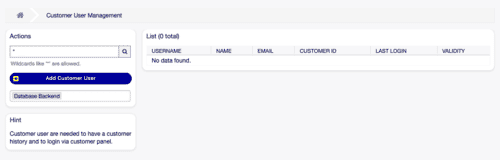
Customer user management [1]
Procedure for adding a customer user
Section titled “Procedure for adding a customer user”To add a new customer user, follow these steps:
- Click on Add customer user in the navigation area on the left.
- Complete all required input fields.
- Select Save to complete the process.
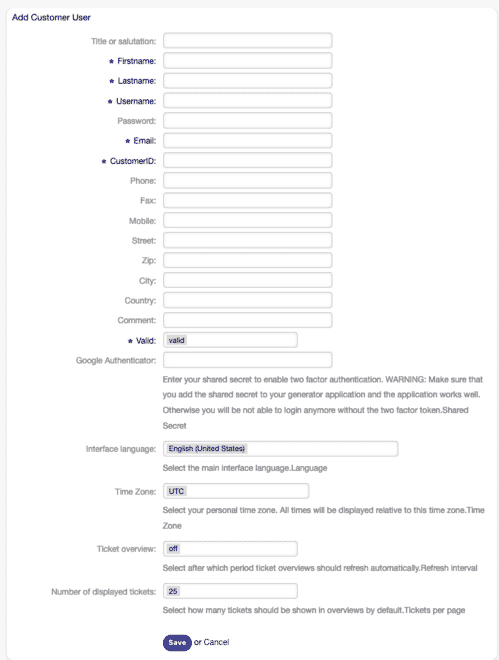
Adding a new customer user [1]
Editing existing customer user data:
Section titled “Editing existing customer user data:”- Select a customer user from the list.
- Make the desired changes.
- Confirm with Save or Save and finish.
![Edit customer user screen [1]](https://softoft.sirv.com/Images/otobo/docs/customer-user-edit)
To locate specific customer users, use the search field. Enter a search term and initiate the search using the magnifying glass icon or the Enter key. By default, the first 1000 entries are displayed. This facilitates navigation through large amounts of data.
Permissions and group assignments
Section titled “Permissions and group assignments”An effective method for managing the access rights of customer users is to assign users or customers to groups. This allows for the configuration of a detailed permission matrix. The final access rights of a user can be viewed at any time in the Effective permissions area at the bottom of the edit page for customer users.
![Effective permissions for customer user widget [1]](https://softoft.sirv.com/Images/otobo/docs/customer-user-effective-permission)
Configuration of customer users
Section titled “Configuration of customer users”The following fields are available when adding or editing a customer user (required fields are marked with an asterisk):
- Title or salutation: Optional specification of a prefix, such as Mr., Ms., Dr., etc.
- **First name * **: Enter the first name of the customer user.
- **Last name * **: The last name of the customer user.
- Username *: Required for logging into the system.
- Password: Automatically generates a password if this field is left empty.
Conclusion
Section titled “Conclusion”Managing customer users within OTOBO enables a detailed, structured, and secure organization of customer information, which is crucial for the smooth operation of customer relationships. Through individual settings and permission management, OTOBO offers a flexible platform for optimizing customer service.
Advanced customer user data
Section titled “Advanced customer user data”Below is an overview of additional fields available when creating or editing customer users in OTOBO:
Email *
: The email address of the customer user represents a central communication channel and is therefore a required field.
Customer ID *
: Uniquely identifies the customer company to which the customer user is assigned. Selection is made from the predefined list of Customers stored in the system.
Phone
: The phone number allows for direct verbal exchange with the customer user.
Fax
: The fax number offers an alternative way to transmit written documents.
Mobile
: The customer user can also be reached on the go via the mobile number.
Street
: The street name, together with the following information, is used to generate a complete postal address.
Zip code
: The zip code allows for location-based assignment and identification.
City
: The city specification contributes to further precision of the address.
Country
: The country provides information about the geographical area of operation of the customer user.
Comment
: This optional field can be used to store additional information or notes, thus promoting transparent communication.
Valid *
: The validity setting is crucial for the activity of the customer user profile in the system.
Database backend
Section titled “Database backend”In addition to the standard method of storing customer user data in the internal database, OTOBO also supports the connection of external directory services such as LDAP. Administrators can easily configure the database backend to ensure smooth and seamless integration of customer user data.
## CustomerUser# Database backend configuration$Self->{CustomerUser} = {    Name   => 'Database Backend',    Module => 'Kernel::System::CustomerUser::DB',    Params => {
        Table => 'customer_user',
SearchCaseSensitive => 0, },};By configuring the database backend according to your specific needs, you ensure that all customer information is stored securely and in an organized manner, while simultaneously being used efficiently for authentication processes and personalized customer interaction. Within the configuration of OTOBO for managing customer users, the structure and scope of the data to be collected can be precisely tailored to the needs and processes of a company. The configuration presented opens up diverse possibilities for adapting and optimizing data collection and management, which in turn supports efficient and targeted customer communication.
Detailed customer profiles enable personalized communication
Section titled “Detailed customer profiles enable personalized communication”The mapping elements define specifically which information is stored in the system and how it should be processed. In particular, the required fields such as Email, Customer ID, and the Username are essential for authentication and individual communication with the customer. Fields such as Title, First name, Last name, Phone number, Mobile phone number, Fax number, Street, Zip code, City, Country, and Comment allow for comprehensive data collection that can elevate customer service to a more personal level.
The configuration options such as CustomerUserSearchFields, CustomerUserSearchPrefix, CustomerUserSearchSuffix, and CustomerUserSearchListLimit offer further customization options regarding the search for customer user data within the system. This facilitates the quick finding and editing of specific customer data and information.
Seamless integration into existing system landscapes
Section titled “Seamless integration into existing system landscapes”OTOBO supports the connection to customer backends such as databases and LDAP, allowing customer user management to be seamlessly integrated into existing IT infrastructures. By providing a configuration that is directly adjustable via Kernel/Config.pm, OTOBO ensures flexible handling of various user data sources. Special settings such as CacheTTL for controlling the cache lifetime allow for finely adjustable performance optimization according to individual requirements.
Security and compliance through clear access regulations
Section titled “Security and compliance through clear access regulations”With the configuration options ReadOnly and the restriction regarding the display of own tickets in the customer panel (CustomerUserExcludePrimaryCustomerID), OTOBO offers comprehensive options to meet security and compliance requirements. The clear assignment of Customers to companies (CustomerCompanySupport) also facilitates the management of access rights and promotes compliance with data protection guidelines.
Final thoughts
Section titled “Final thoughts”Configuring OTOBO for the optimal use of customer user data is a crucial step for companies that want to increase their service quality and create personalized customer experiences. The flexibility in customization and the choice between database- or LDAP-based backends provide a solid foundation for implementing effective customer management. Here, I show how you can specifically expand and adapt the customer user configuration in OTOBO to meet your company-specific requirements.
Expanding customer user data
Section titled “Expanding customer user data”Integrating new fields or modifying existing fields within the mapping allows for customized collection of customer information. For example, adding a room number field can improve internal organization by making specific customer data immediately available.
-
Updating the
customer_userdatabase table: To add a field likeroomfor the room number, you must first add the corresponding column to the table.For MySQL or MariaDB:
Terminal window mysql -u root -p -e 'ALTER TABLE otobo.customer_user ADD room VARCHAR (250)'For PostgreSQL:
Terminal window psql -c 'ALTER TABLE customer_user ADD COLUMN room varchar(250)' -
Adjustment in
Kernel/Config.pm: Copy the$Self->{CustomerUser}section fromKernel/Config/Defaults.pmintoKernel/Config.pmand expand it with the new field in theMaparray.[ 'UserRoom', 'Room', 'room', 0, 1, 'var', '', 0, undef, undef ],
LDAP backend
Section titled “LDAP backend”For organizations that already use LDAP for managing user identities, OTOBO offers the possibility to configure this existing directory service as a backend for customer user data. Integration into LDAP enables synchronized and automated data reconciliation, thereby minimizing manual, maintenance-intensive processes.
$Self->{CustomerUser} = { Name => 'LDAP Backend', Module => 'Kernel::System::CustomerUser::LDAP', Params => { Host => 'your.ldap.server', BaseDN => 'ou=users,o=example', SSCOPE => 'sub', UserDN => '', UserPw => '', AlwaysFilter => '', SourceCharset => 'utf-8', Params => { port => 389, timeout => 120, async => 0, version => 3, }, }, CustomerKey => 'uid', CustomerID => 'mail', CustomerUserListFields => ['cn', 'mail'], CustomerUserSearchFields => ['uid', 'cn', 'mail'], Map => [ ['UserTitle', 'Title or salutation', 'title', 1, 0, 'var', '', 1, undef, undef], ['UserFirstname', 'First name', 'givenname', 1, 1, 'var', '', 1, undef, undef], ... ],};Conclusion
Section titled “Conclusion”By adapting and expanding the customer user configuration in OTOBO, companies can build a more detailed and meaningful data basis of their Customers. The choice between a database- and an LDAP-based solution provides the necessary flexibility to optimally integrate customer management into the existing IT landscape. Such adjustments lay the foundation for improved customer service and deeper customer relationships. The management of customer users in OTOBO offers enormous flexibility to integrate different data sources such as databases and LDAP directories, as well as to effectively transfer customer data into dynamic fields of tickets. This enables companies to use detailed customer information for improved service and efficient processes.
Using multiple customer user backends
Section titled “Using multiple customer user backends”OTOBO allows the parallel use of multiple backends for managing customer user data. For example, you can use both a database and an LDAP directory to store and retrieve central customer information. By numbering the configuration parameters such as CustomerUser1, CustomerUser2, etc., up to 10 different backends can be seamlessly integrated.
To activate and configure an LDAP backend, it is necessary to copy the corresponding $Self->{CustomerUser} section from Kernel/Config/Defaults.pm into Kernel/Config.pm and activate the commented-out lines by removing the comment characters. The configuration can be personalized by adding further attributes, such as a mobile phone number, to map additional information stored in the LDAP directory.
Dynamic fields for customer data
Section titled “Dynamic fields for customer data”An advanced way to use customer information is to store this data directly in dynamic fields of tickets. This can be used, among other things, to create specific statistics on customer data. To activate this function, the corresponding settings Ticket::EventModulePost###4100-DynamicFieldFromCustomerUser and DynamicFieldFromCustomerUser::Mapping must be activated within OTOBO. After activation, selected customer data can be automatically transferred to the defined dynamic fields of a ticket as soon as the ticket is created or the customer user of a ticket is changed. With the setup of dynamic fields that can be set manually, OTOBO enables an additional level of personalization and data enrichment for every customer contact. It is important to ensure that dynamic fields, which are automatically set by the system based on customer user data, do not conflict with manually edited fields in various ticket creation frontends such as phone, email, or customer view.
Customer user ↔ Customer relationships
Section titled “Customer user ↔ Customer relationships”The structured management of customer user ↔ Customer relationships offers companies the possibility to grant individual customer users access to tickets of multiple Customers. This is particularly useful in complex organizational structures or in cases where partners or corporations require insight into requests from their subsidiaries or related companies.
Assigning a customer user to one or more customers:
Section titled “Assigning a customer user to one or more customers:”- Selection of the customer user: In the management overview, click on the name of the customer user to whom you want to assign additional Customers.
- Selection of assignable customers: Check the boxes next to the customers that should be assigned to this user.
- Saving the assignment: Confirm the selection by clicking Save or Save and finish to establish the new customer relationships.
Assigning multiple customer users to customers
Section titled “Assigning multiple customer users to customers”- Selection of the customer: In the management overview, click on the name of the customer to whom you want to assign additional customer users.
- Selection of assignable customer users: Check the boxes next to the customer users that should be assigned to this Customer.
- Saving the assignment: Confirm the selection and save the changed relationships.
Customer user ↔ Group access management
Section titled “Customer user ↔ Group access management”Assigning group permissions to customer users in OTOBO enables differentiated access control, ensuring that Customers can only view and edit information that is relevant to them. This protects against unauthorized access to internal processes and ensures clearly structured and focused communication.
Conclusion
Section titled “Conclusion”The sophisticated options for configuring customer relationships and access rights in OTOBO ensure that companies can build efficient and targeted customer communication. Through the careful design of access rights and relationship structures between customer users, Customers, and groups, customer service processes can be optimized and customer satisfaction increased. The management of customer user ↔ Groups relationships in OTOBO allows organizations to effectively control their customers’ access to tickets and processes. This not only increases security and data protection within the ticket system but also helps customer users focus on relevant content without being distracted by the complexity of internal workflows.
Customer user ↔ Group relationships
Section titled “Customer user ↔ Group relationships”To optimize the use of this function, a customer user as well as one or more Groups must first be stored in the system. Subsequently, the administrator can establish the specific relationships between customer users and groups, which allows customer users access to defined tickets and information.
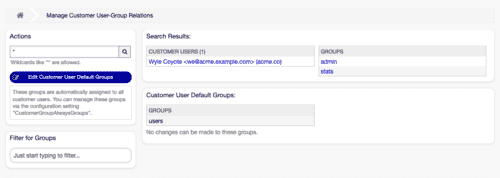
Managing customer user-group relationships[1]
Activation of the customer group function
Section titled “Activation of the customer group function”Before the customer group function can be used, it must be activated in the OTOBO system. This can be done via the system configuration. When using external backends or directory services, a special configuration file may be necessary.
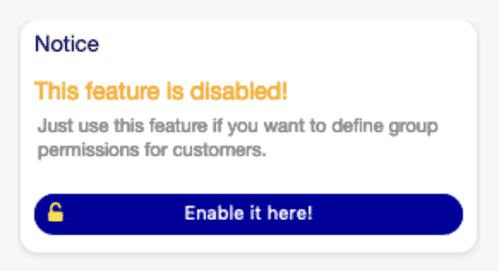
Activate customer group function [1]
Steps for assigning Groups to customer users:
Section titled “Steps for assigning Groups to customer users:”- Selection of the customer user: Click on the name of the customer user to whom you want to assign Groups.
- Assignment of groups: Select the appropriate groups that should be assigned to this customer user.
- Saving the settings: Confirm your selection by clicking Save.
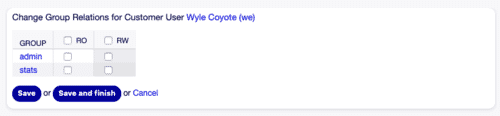
Change group relationships for customer user [1]
Steps for assigning customer users to groups:
Section titled “Steps for assigning customer users to groups:”- Selection of the group: Select the group to which customer users should be assigned.
- Assignment of customer users: Mark those customer users who should receive access to the group.
- Saving the settings: Confirm the changes by clicking Save.
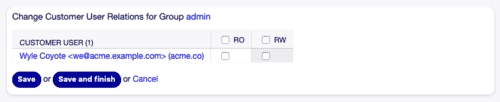
Change customer user relationships for group [1]
Reference for customer user ↔ Group permissions
Section titled “Reference for customer user ↔ Group permissions”The assignment of permissions is the core of relationship design between customer users and groups. By defining permissions, it is regulated which actions customer users are allowed to perform with regard to tickets and ticket groups. These permissions typically include:
- Read: Allows customer users to read tickets of a group.
- Create: Allows customer users to create new tickets in a group.
- Edit: Allows customer users to edit tickets in a group.
The careful coordination of these permissions ensures that customer users receive exactly the right amount of access to communicate their concerns effectively without violating security or data protection guidelines. The management of customer user ↔ Service relationships in OTOBO is an essential module that enables a high degree of service personalization for end customers. This process allows specific services to be assigned to a customer user or vice versa, which can result in a significant increase in service quality and customer satisfaction. Manage OTOBO groups
Management of access permissions
Section titled “Management of access permissions”There are two main types of permissions that can be set when assigning resources to customer users or groups:
- Read-only access (
ro): Allows access to a resource without being able to make changes to it. - Full read and write access (
rw): Grants comprehensive access to a resource, including the ability to edit.
The detailed control of these permissions ensures secure and targeted resource usage as well as the integrity of service processes.
Assignment of services to customer users and vice versa
Section titled “Assignment of services to customer users and vice versa”The core functionality of the customer user ↔ Service module enables fine-grained assignment of services to individual customer users or groups of customer users to specific services. This supports companies in offering a tailored service portfolio while simultaneously simplifying internal service management.
To assign specific services to a customer user or customer users to a service, follow these steps:
- Selection of the assignment object: Select either a customer user or a service from the corresponding column.
- Make assignment: Select the desired services or customer users.
- Confirmation: Save your selection by clicking the Save or Save and finish button.
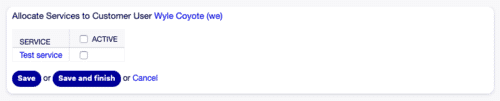
Change service relationships for customer user [1] Manage OTOBO services
Management of default services
Section titled “Management of default services”The function to define default services significantly reduces administrative effort by allowing certain services to be assigned to all customer users as a default. This is particularly useful for basic or general services that should be accessible to every Customer.
To edit default services:
- Edit default services: Via the corresponding button in the sidebar.
- Selection of services: Select the desired services that should be available to all customer users.
- Saving the configuration: With a click on Save.
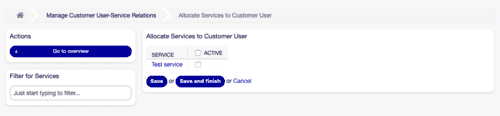
Assign services for customer user screen [1]
Conclusion
Section titled “Conclusion”The customer user ↔ Service module in OTOBO is a powerful tool that enables companies to optimally structure their service offerings and respond individually to customer needs. Through the careful management of service access, companies can not only improve their service quality but also make their internal processes more efficient.
Frequently asked questions
What is a customer user in OTOBO?
A customer user is an individual contact linked to a customer company, with login and contact details for support.
Do I need a customer before adding a customer user?
Yes. At least one customer must exist before you can add customer users in the Customer User admin module.
Can I manage customer users with an LDAP backend?
LDAP and similar directory backends limit create/edit in the UI; full add/edit typically requires a database backend.
What should I know about Permissions and group assignments?
An effective method for managing the access rights of customer users is to assign users or customers to groups. This allows for the configuration of a detailed permission matrix. The final access rights of a user can be viewed at any time in the _Effective permissions_ area at the bottom of the…
What should I know about Detailed customer profiles enable personalized communication?
The mapping elements define specifically which information is stored in the system and how it should be processed. In particular, the required fields such as _Email_, _Customer ID_, and the _Username_ are essential for authentication and individual communication with the customer. Fields such as…