
OTOBO Kerberos SSO – Single Sign-On with Active Directory
Introduction
Section titled “Introduction”Kerberos SSO (Single Sign-On) enables seamless login for your agents via Active Directory without transmitting passwords in plain text. In a Docker-based OTOBO installation, NGINX is used as a web proxy with the SPNEGO module, which is compiled in a separate “builder” container. Subsequently, the dynamically generated module (ngx_http_auth_spnego_module.so) is transferred to the actual NGINX container, and the standard configuration is replaced by a Kerberos-enabled one :contentReference[oaicite:0]{index="0"}.
This follows the proven procedure in the official OTOBO Docker project, which implements a clear separation between build and runtime stages.
In this article, you will receive:
- A comprehensive overview of the differences between OTOBO and Znuny in the context of Kerberos SSO.
- A step-by-step guide from AD preparation and keytab creation to Docker configuration.
- Tips on debugging, browser setup, and best practices for various OTOBO versions.
Differences from other systems
Section titled “Differences from other systems”Although OTOBO and Znuny are functionally very similar (both originate from the original OTRS project), there are the following fine-tuned adjustments in the Kerberos context:
- Configuration paths: OTOBO uses
/opt/otobo-docker/nginx-conf/krb5.confby default, while Znuny typically relies on/opt/znuny/nginx-conf/krb5.conf. - Template files: The NGINX templates differ slightly in names and placeholder syntax; OTOBO provides a file
otobo_nginx-kerberos.conf.template, while Znuny provides a similarly namedznuny_nginx-kerberos.conf.template. - Versioning: OTOBO 11.x introduces extended SSO parameters (“KerberosAdminServer”, “KerberosDefaultDomain”) that are still missing in Znuny 6.x.
Prerequisites
Section titled “Prerequisites”- Active Directory with Kerberos (Realm and KDC already set up).
- An OTOBO Docker setup according to Official Installation with Docker :contentReference[oaicite:2]{index="2"}.
- DNS records:
- An A-Record for your OTOBO FQDN (no CNAME!), e.g.,
otobo.example.com → 192.0.2.10. - Reverse lookup for the hostname so that Kerberos SPN resolutions work.
- An A-Record for your OTOBO FQDN (no CNAME!), e.g.,
1. Active Directory User and SPN
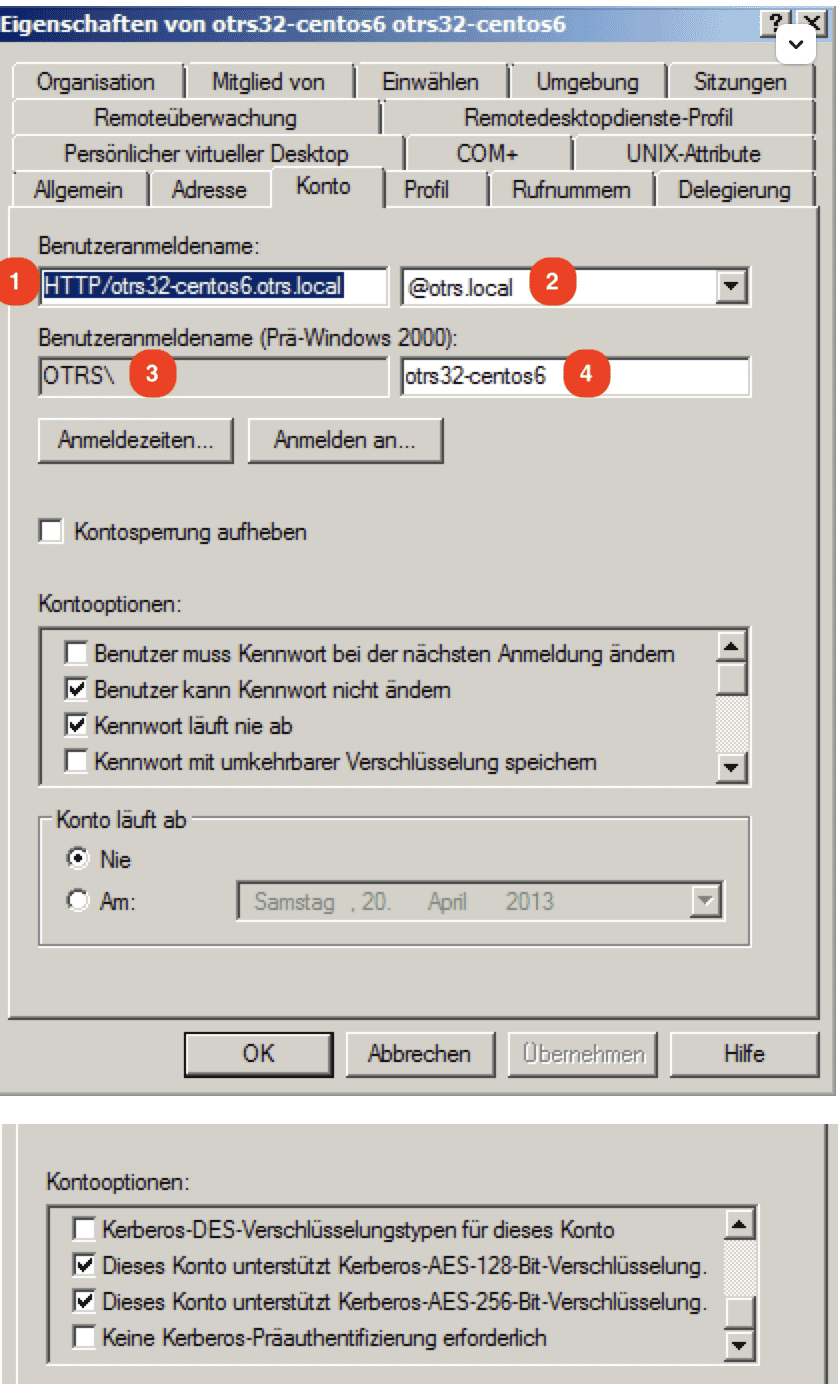
Section titled “1. Active Directory User and SPN”1.1 Create user
Section titled “1.1 Create user”Create a dedicated service account in your AD, e.g., HTTP/otobo.example.com (UserPrincipalName). Note:
- Capitalization for
HTTP/; Kerberos expects exactly this prefix :contentReference[oaicite:3]{index="3"}. - No special characters in the password (e.g.,
&).
1.2 Generate SPN and Keytab
Section titled “1.2 Generate SPN and Keytab”Log in to a DC with admin rights and use ktpass.exe:
ktpass.exe \ -princ HTTP/otobo.example.com@EXAMPLE.COM \ -mapUser EXAMPLE\\otobo-svc \ -crypto All \ -pass SvcUserPassword \ -ptype KRB5_NT_PRINCIPAL \ -out C:\krb5.keytab-princ: SPN with realm in uppercase.-mapUser: SAM account name (pre-W2K), e.g.,otobo-svc(doc.otobo.de).-out: Path to the keytab on the DC.
Then move the keytab to the Docker host:
docker_admin> mkdir -p /opt/otobo-docker/nginx-confdocker_admin> mv /path/to/krb5.keytab /opt/otobo-docker/nginx-conf/krb5.keytab2. NGINX with SPNEGO module
Section titled “2. NGINX with SPNEGO module”2.1 Build stage in Dockerfile
Section titled “2.1 Build stage in Dockerfile”The official Dockerfile uses a separate builder with the necessary dev packages:
FROM nginx:mainline AS builder-for-kerberos...RUN apt-get update && apt-get install -y gcc libc-dev make libpcre3-dev zlib1g-dev libkrb5-dev wgetWORKDIR /usr/srcRUN wget http://nginx.org/download/nginx-${NGINX_VERSION}.tar.gz \ && wget https://github.com/stnoonan/spnego-http-auth-nginx-module/archive/${SPNEGO_AUTH_COMMIT_ID}.tar.gzRUN tar -xzf nginx.tar.gz \ && tar -xzf spnego-http-auth.tar.gz \ && cd nginx-${NGINX_VERSION} \ && ./configure --with-compat ${NGINX_CONFIG} --add-dynamic-module=../spnego-http-auth-nginx-module-${SPNEGO_AUTH_COMMIT_ID_FILE} \ && make modules \ && cp objs/ngx_http_auth_spnego_module.so /usr/lib/nginx/modules/This compiles the SPNEGO module to be compatible with your NGINX release (extras.getpagespeed.com).
2.2 Configuration in the runtime container
Section titled “2.2 Configuration in the runtime container”FROM nginx:mainline AS otobo-nginx-kerberos-webproxy
COPY --from=builder-for-kerberos /usr/lib/nginx/modules/ngx_http_auth_spnego_module.so /usr/lib/nginx/modules
RUN apt-get update && apt-get install -y krb5-user libpam-krb5 libpam-ccreds krb5-multidev libkrb5-dev
COPY templates/ kerberos/templatesCOPY docker-entrypoint.d/21-envsubst-on-krb5-conf.sh /docker-entrypoint.d/RUN sed -i '4i load_module modules/ngx_http_auth_spnego_module.so;' /etc/nginx/nginx.conf- Module-Load: Insert
load_modulein line 4. - Envsubst scripts generate
/etc/krb5.conffrom template data.
3. Docker Volumes & nginx templates
Section titled “3. Docker Volumes & nginx templates”3.1 Create custom volume
Section titled “3.1 Create custom volume”docker volume create otobo_nginx_custom_configmp=$(docker volume inspect --format '{{ .Mountpoint }}' otobo_nginx_custom_config)docker create --name tmp-nginx rotheross/otobo-nginx-webproxy:latest-11_0docker cp tmp-nginx:/etc/nginx/templates/otobo_nginx-kerberos.conf.template.hidden $mp/otobo_nginx.conf.templatedocker rm tmp-nginx3.2 docker-compose override
Section titled “3.2 docker-compose override”Create docker-compose/otobo-nginx-custom-config.yml:
version: '3.7'services: nginx: volumes: - otobo_nginx_custom_config:/etc/nginx/config/template-customActivate in the main .env:
COMPOSE_FILE=docker-compose.yml:docker-compose/otobo-nginx-custom-config.ymlNGINX_ENVSUBST_TEMPLATE_DIR=/etc/nginx/config/template-custom4. .env adjustments
Section titled “4. .env adjustments”-
Back up your old
/opt/otobo-docker/.env:Terminal window mv .env .env.bakcp .docker_compose_env_https_kerberos .env -
Add the Kerberos variables:
OTOBO_NGINX_KERBEROS_KEYTAB=/opt/otobo-docker/nginx-conf/krb5.keytabOTOBO_NGINX_KERBEROS_CONFIG=/opt/otobo-docker/nginx-conf/krb5.confOTOBO_NGINX_KERBEROS_SERVICE_NAME=HTTP/otobo.example.comOTOBO_NGINX_KERBEROS_REALM=EXAMPLE.COMOTOBO_NGINX_KERBEROS_KDC=dc1.example.comOTOBO_NGINX_KERBEROS_ADMIN_SERVER=dc1.example.comOTOBO_NGINX_KERBEROS_DEFAULT_DOMAIN=example.com -
Transfer SSL certificates and DB passwords from your old
.env.bak.
Then start with:
docker-compose down && docker-compose up -d``` :contentReference[oaicite:6]{index=6}.
## 5. OTOBO configuration
### 5.1 Auth module in `Kernel/Config.pm`
Comment out LDAP/DB auth and add the following to your `Kernel/Config.pm`:```perl$Self->{AuthModule} = 'Kernel::System::Auth::HTTPBasicAuth';$Self->{'AuthModule::HTTPBasicAuth::ReplaceRegExp'} = '^(.+?)@.+?$';
This ensures REMOTE_USER is correctly interpreted as a login (doc.otobo.de).
5.2 Activation in the Admin Interface
Section titled “5.2 Activation in the Admin Interface”-
System Configuration:
- Set
Customer::AuthModuletoHTTPBasicAuth. - Apply
AuthModule::HTTPBasicAuth::ReplaceRegExp.
- Set
-
Kernel/Config -> Run Deploy.
6. Browser setup
Section titled “6. Browser setup”For SPNEGO to work, your browser must accept the host as trusted:
Chrome / Edge / IE
Section titled “Chrome / Edge / IE”- “Internet Options” → Security → Local Intranet → Sites
- Add domain
https://otobo.example.comand enable “Integrated Windows Authentication” (doc.otobo.de).
Firefox
Section titled “Firefox”- Enter
about:configin the address bar. network.negotiate-auth.trusted-uris = https://otobo.example.comnetwork.negotiate-auth.delegation-uris = https://otobo.example.com
7. Debugging & Troubleshooting
Section titled “7. Debugging & Troubleshooting”-
Check NGINX logs
Terminal window docker logs otobo_nginx_1 -f -
Enter the container
Terminal window docker exec -it otobo_nginx_1 bashcat /etc/krb5.confklist -e -
Get SPN token
Terminal window env KRB5_TRACE=/dev/stdout kvno HTTP/otobo.example.com@EXAMPLE.COM -
Test keytab
Terminal window kinit -VV -k -t /etc/krb5.keytab HTTP/otobo.example.com@EXAMPLE.COMError
KDC cannot fulfill request→ DNS/SPN incorrect (plugins.miniorange.com).
8. Best Practices & Security
Section titled “8. Best Practices & Security”- Separate keytab: Never reuse the LDAP sync service account; avoid password collisions.
- Least Privilege: Assign only the minimum necessary AD rights for the SSO account.
- Keytab rotation: Regularly renew the keytab every 90 days.
- TLS for KDC: If possible, enable
ldaps://or GSSAPI over TLS. - Monitoring: Automatically monitor Kerberos tickets using tools like
klistandkvno.
With this comprehensive guide, your OTOBO Docker instance is optimally prepared for Kerberos SSO – including secure, maintainable, and scalable authentication!
Sources:
- rotheross/otobo-nginx-kerberos-webproxy on Docker Hub (hub.docker.com)
- SPNEGO HTTP Auth NGINX Module (stnoonan) (extras.getpagespeed.com)
- Official OTOBO Installation Docs (11.0 SSO Kerberos) (doc.otobo.de)
- GitHub Issue #81: NGINX Kerberos broken (github.com)
- miniOrange Kerberos SSO Guide (plugins.miniorange.com)
- OTOBO Docker Override HTTPS-Kerberos (github.com)
- OTOBO Developer and Administrator Manuals
- Microsoft Docs: ktpass.exe (community.znuny.org)
- Mozilla MDN: SPNEGO in Firefox (doc.otobo.de)
- NGINX Docs: dynamic modules (extras.getpagespeed.com)
Frequently asked questions
What does Kerberos SSO provide for OTOBO agents?
It enables seamless Active Directory login without sending passwords in plain text, typically via NGINX SPNEGO in Docker setups.
What are the main prerequisites for Kerberos SSO?
You need Active Directory with Kerberos, an OTOBO Docker setup, correct DNS A records, and a keytab for the HTTP SPN.
Does Kerberos configuration differ between OTOBO and Znuny?
Paths and NGINX templates differ slightly; OTOBO uses otobo-docker nginx paths and Kerberos-specific template names.
What should I know about Introduction?
Kerberos SSO (Single Sign-On) enables seamless login for your agents via Active Directory without transmitting passwords in plain text. In a Docker-based OTOBO installation, NGINX is used as a web proxy with the SPNEGO module, which is compiled in a separate "builder" container. Subsequently, the…
What should I know about Differences from other systems?
Although OTOBO and Znuny are functionally very similar (both originate from the original OTRS project), there are the following fine-tuned adjustments in the Kerberos context: Configuration paths: OTOBO uses `/opt/otobo-docker/nginx-conf/krb5.conf` by default, while Znuny typically relies on…